Monday, May 09, 2011
Interview and giveaway
Australian Bookshelf has interviewed me about Kea's Flight and is offering a free copy to fans of the blog.

Jewelry time!
Alexandrite is wonderful, and I'm not just saying that because it's my birthstone. Here are three neat things about it:
1. It can look very different colors in different lighting. The range of the color change depends on the stone, but the best alexandrite stones can go all the way from green to red when the light dims.
2. It's one of the most durable gemstones out there. Its hardness (resistance to scratching) is near diamond, and its toughness (resistance to cracking) is better than diamond. This makes it a very good stone for rings.
3. It is extraordinarily rare. The best mines of alexandrite are all used up already. Good natural stones are hard to find, and a large, high-quality natural alexandrite with a good range of color change is one of the most expensive gems you can buy.
My usual sources for jewelry supplies didn't sell alexandrite-- not even lab grown, just "simulated." So it was really cool when I found some little tiny ones on Etsy for $8: a set of seven 2-3mm natural cat's eye cabochons.
The stones are varied, and have have a small but nice range of color change. The pictures in the listing showed them all looking dark blue with no flash and then looking pink with flash... obviously in normal lighting the color change is subtler, a range including brownish-green, gray-green, sea-green and deep blue-green (it varies depending on the individual stone, too). Better yet, they're cat's eye stones, which means there's a nice glowy stripe visible across the stone sometimes.
I decided to make some jewelry. After much practice making rings, here's the one I like best:
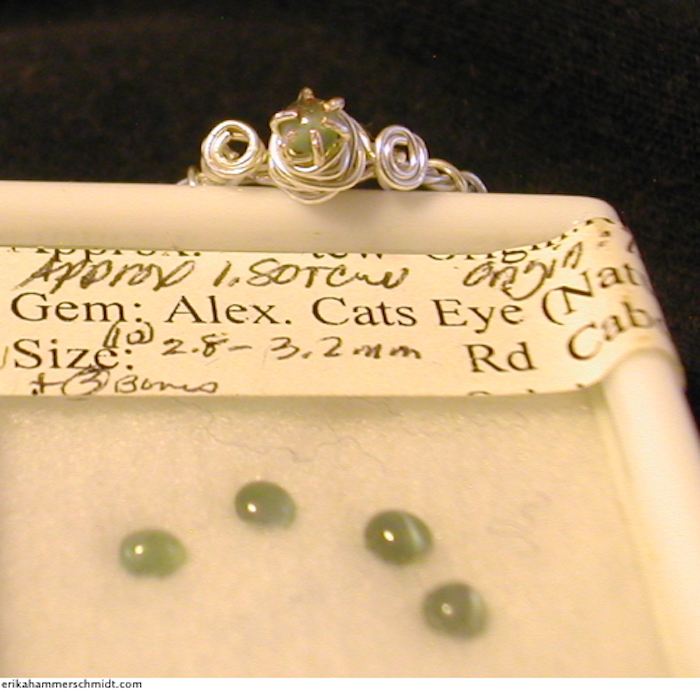
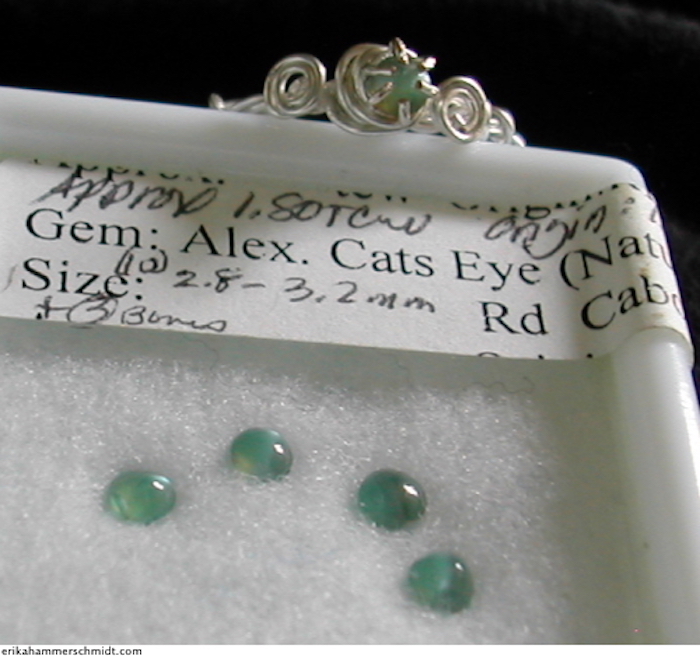
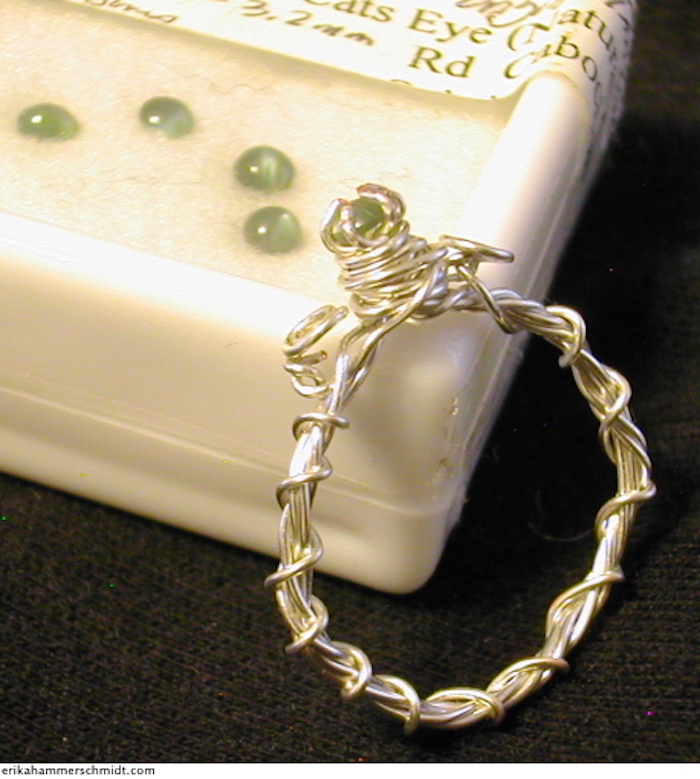
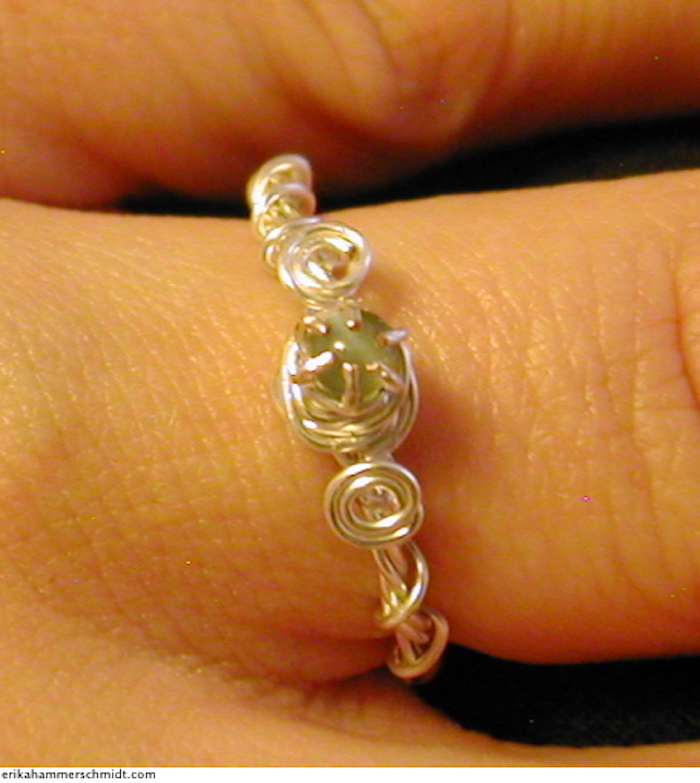
The pictures aren't all that faithful to the color. In real life, the stone on that ring appears brownish-gray-green in bright artificial light, and blue-green in bright natural light, with some range in between. The four stones I haven't made into jewelry yet range from green to blue-green in natural light, and green to dark blackish-blue in artificial light.
Then there are two that I decided to make into earrings, which change from deep blue-green to a brownish-blue that's almost black. This is how they look in photos:
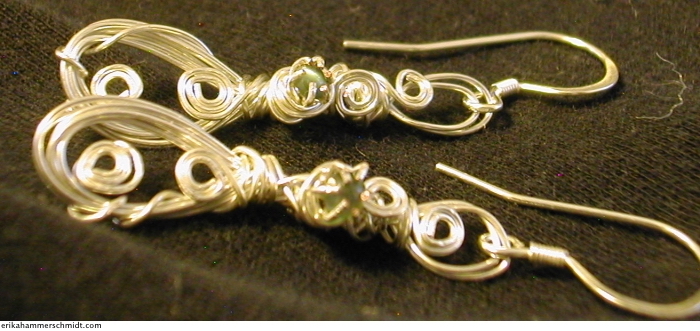
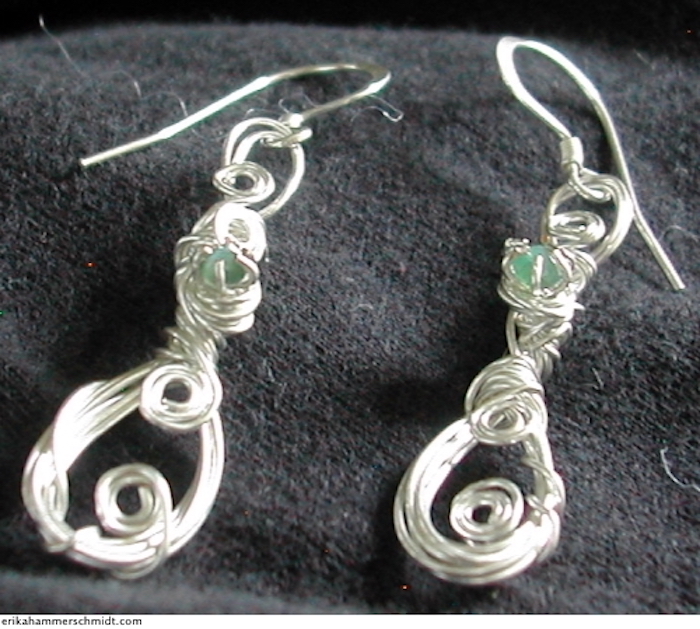
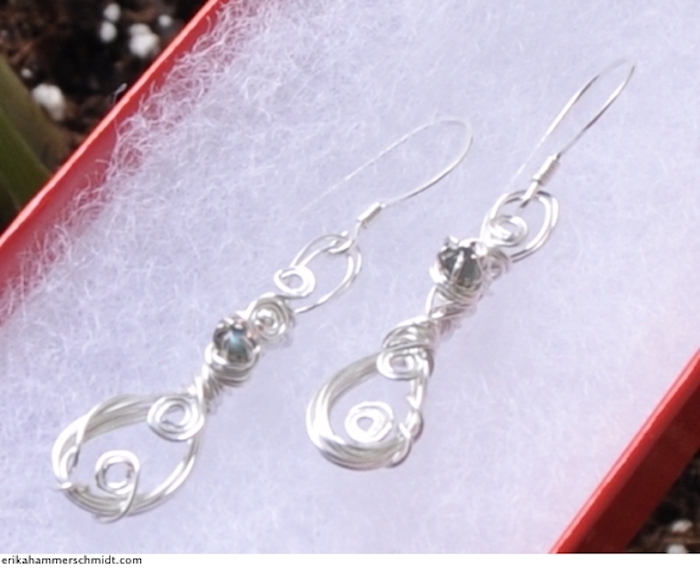
The earrings are for my mother-in-law, and I think I'll wear the ring often. It's a new design that I hadn't used before. My previous rings have all been very delicate and easily bent out of shape, but this one has held up to several days of everyday life, including some work in the stockroom at Target.
1. It can look very different colors in different lighting. The range of the color change depends on the stone, but the best alexandrite stones can go all the way from green to red when the light dims.
2. It's one of the most durable gemstones out there. Its hardness (resistance to scratching) is near diamond, and its toughness (resistance to cracking) is better than diamond. This makes it a very good stone for rings.
3. It is extraordinarily rare. The best mines of alexandrite are all used up already. Good natural stones are hard to find, and a large, high-quality natural alexandrite with a good range of color change is one of the most expensive gems you can buy.
My usual sources for jewelry supplies didn't sell alexandrite-- not even lab grown, just "simulated." So it was really cool when I found some little tiny ones on Etsy for $8: a set of seven 2-3mm natural cat's eye cabochons.
The stones are varied, and have have a small but nice range of color change. The pictures in the listing showed them all looking dark blue with no flash and then looking pink with flash... obviously in normal lighting the color change is subtler, a range including brownish-green, gray-green, sea-green and deep blue-green (it varies depending on the individual stone, too). Better yet, they're cat's eye stones, which means there's a nice glowy stripe visible across the stone sometimes.
I decided to make some jewelry. After much practice making rings, here's the one I like best:
The pictures aren't all that faithful to the color. In real life, the stone on that ring appears brownish-gray-green in bright artificial light, and blue-green in bright natural light, with some range in between. The four stones I haven't made into jewelry yet range from green to blue-green in natural light, and green to dark blackish-blue in artificial light.
Then there are two that I decided to make into earrings, which change from deep blue-green to a brownish-blue that's almost black. This is how they look in photos:
The earrings are for my mother-in-law, and I think I'll wear the ring often. It's a new design that I hadn't used before. My previous rings have all been very delicate and easily bent out of shape, but this one has held up to several days of everyday life, including some work in the stockroom at Target.
Sunday, May 08, 2011
Reviews and Interviews
The Autism Conference went quite well! We met many interesting people and had a lot of great conversations.
Also, our Virtual Book Tour is getting off to a good start. A very enthusiastic review is up at Crack a Spine Book Reviews today. We also did a lengthy author interview there, in case you're interested.
Also, our Virtual Book Tour is getting off to a good start. A very enthusiastic review is up at Crack a Spine Book Reviews today. We also did a lengthy author interview there, in case you're interested.
Monday, May 02, 2011
AUSM Conference Times
Here is the schedule for Friday at the AUSM conference. The times in bold are when John and I will be in the book room signing stuff. We're really looking forward to it!
2011 Minnesota Autism Conference: Designing Futures for Autism
Schedule for Friday, May 6
Registration: 7:30 - 8:30
Keynote: 8:30-10:30
Break: 10:30-11:00
General Address: 11:00-12:00
Lunch & Local Author Event: 12:00 - 1:00
Breakouts I: 1:00-2:00
Break & Local Author Event: 2:00-2:30
Breakouts II & III: 2:30 - 4:45
2011 Minnesota Autism Conference: Designing Futures for Autism
Schedule for Friday, May 6
Registration: 7:30 - 8:30
Keynote: 8:30-10:30
Break: 10:30-11:00
General Address: 11:00-12:00
Lunch & Local Author Event: 12:00 - 1:00
Breakouts I: 1:00-2:00
Break & Local Author Event: 2:00-2:30
Breakouts II & III: 2:30 - 4:45
Sunday, April 24, 2011
Virtual Book Tour
Kea's Flight is having a virtual book tour this May! I will be writing two guest posts, doing three interviews, and being reviewed five times. Check out the link to see what sites I'll be on, and when!

Saturday, April 23, 2011
AWESOMECON!
Remember last May, when I signed copies of Born on the Wrong Planet for a day at the AUSM Conference? Well, I'm signing books there again this year... only, this time I'll have copies of Kea's Flight to sign too!
If all goes well, John will also be there, signing copies of his short story, Precious Metal. So, if you're registered for the conference, be sure to stop by the book room on Friday, May 6th, and say hi to us!
If all goes well, John will also be there, signing copies of his short story, Precious Metal. So, if you're registered for the conference, be sure to stop by the book room on Friday, May 6th, and say hi to us!
Friday, April 08, 2011
Nook problem solved
OK, everyone, I figured out the Nook problem mentioned in my previous post.
The sample chapter you can download from the Kea's Flight Nook listing is unreadable on my computer, but when I downloaded the Nook app for my iPod Touch and opened the sample on that, all the text was perfectly readable. Apparently when they make the sample, they make it so that only Nook software can read it.
Weirdly, the starship diagram on page three was only partly visible when reading the sample on the iPod Touch Nook app, but it was fully visible when using the Nook preview software, prior to listing the book. So I can only assume that it was cut to fit on the small screen of the iPod Touch, and it would show up fine on an actual Nook. (If you want to read Kea's Flight on an iPod Touch, it makes more sense to get the epub from Lulu anyway. The Kindle edition works too, if you have the Kindle app for your iTouch.)
Monday, April 04, 2011
Nook bugs
OK, everyone, I have a question.
I've put Kea's Flight up for sale as a NookBook:
http://search.barnesandnoble.com/Keas-Flight/Erika-Hammerschmidt/e/2940012378828
I submitted the same ePub file that I submitted to Lulu (it uploaded there successfully, and it reads fine on my iPod touch). When I chose the Preview option on the Barnes and Noble site after I uploaded it, it was perfectly readable. But when I try downloading a sample from the product page, I get an epub file full of unreadable symbols.
Maybe they change the ePub file so that it can only be read on a Nook? Do any of you have a Nook you can test the sample on? If you have any insights that may help, please email me at humanalien at gmail dot com.
Thank you.
I've put Kea's Flight up for sale as a NookBook:
http://search.barnesandnoble.com/Keas-Flight/Erika-Hammerschmidt/e/2940012378828
I submitted the same ePub file that I submitted to Lulu (it uploaded there successfully, and it reads fine on my iPod touch). When I chose the Preview option on the Barnes and Noble site after I uploaded it, it was perfectly readable. But when I try downloading a sample from the product page, I get an epub file full of unreadable symbols.
Maybe they change the ePub file so that it can only be read on a Nook? Do any of you have a Nook you can test the sample on? If you have any insights that may help, please email me at humanalien at gmail dot com.
Thank you.
Saturday, April 02, 2011
A Nook can't cook
Two items of note today:
1. Cooking:
I learned to make my own granola bars. I got the recipe here. Seriously, it's easy. You just bake some uncooked dry oatmeal in the oven for about twelve minutes, stirring it from time to time. Then you mix it with wheat germ. Then you mix butter, brown sugar, honey and vanilla in a pan on the stove until it's all liquid, and pour it over the dry stuff, and press it into pans, and bake it for about a half hour. You can add any nuts or dried fruits you want (I'm currently trying it with pumpkin seeds and cranberries, and some peanut butter added to the butter.) Have I seriously been buying granola bars from the store all these years?
2. Nooking:
In other news, our novel Kea's Flight is going to be available on the Barnes and Noble Nook Store soon, in addition to the Kindle store and Lulu Marketplace where you can already buy it. It should be up in the next couple days (it says 48 to 72 hours).
1. Cooking:
I learned to make my own granola bars. I got the recipe here. Seriously, it's easy. You just bake some uncooked dry oatmeal in the oven for about twelve minutes, stirring it from time to time. Then you mix it with wheat germ. Then you mix butter, brown sugar, honey and vanilla in a pan on the stove until it's all liquid, and pour it over the dry stuff, and press it into pans, and bake it for about a half hour. You can add any nuts or dried fruits you want (I'm currently trying it with pumpkin seeds and cranberries, and some peanut butter added to the butter.) Have I seriously been buying granola bars from the store all these years?
2. Nooking:
In other news, our novel Kea's Flight is going to be available on the Barnes and Noble Nook Store soon, in addition to the Kindle store and Lulu Marketplace where you can already buy it. It should be up in the next couple days (it says 48 to 72 hours).
Friday, March 25, 2011
Don't you always love a Google Maps bug?
We're considering taking a trip to Pennsylvania sometime soon, and mapping out some of our possible movements yielded this scene. Apparently Google wants us to go straight up into the air, and then back down again. Better get the helicopter car.

Sunday, March 20, 2011
Up again, down again
Please bear with me while I get things sorted out. I promise this roller coaster with the Kindle edition of "Kea's Flight" will be over soon.
Currently it's down because I had to remove the ISBN. I found out that the Kindle edition and the iBookstore edition aren't allowed to use the same ISBN, and I didn't have another one, and Amazon doesn't require one, so I took it off. Alas, that means that http://www.amazon.com/dp/B004QOAVW8 will be unavailable, or at least unreliably available, until 9 on Monday night or later.
After that, I think things will be fine, and I will have no need to change it again for a long time. Thanks to all of you who have bought copies. You're great.
Currently it's down because I had to remove the ISBN. I found out that the Kindle edition and the iBookstore edition aren't allowed to use the same ISBN, and I didn't have another one, and Amazon doesn't require one, so I took it off. Alas, that means that http://www.amazon.com/dp/B004QOAVW8 will be unavailable, or at least unreliably available, until 9 on Monday night or later.
After that, I think things will be fine, and I will have no need to change it again for a long time. Thanks to all of you who have bought copies. You're great.
Saturday, March 19, 2011
Kindle edition is up again!
The Kindle version of Kea's Flight was down, but now it is available again, with a new lower price and some typos fixed. Same with the other e-versions.
In other news, pretty buttons on the Kea page! Well, as pretty as I could make them, for now. I might be able to improve their looks later when I have more time.
In other news, pretty buttons on the Kea page! Well, as pretty as I could make them, for now. I might be able to improve their looks later when I have more time.
Thursday, March 17, 2011
More book changes
Fixed the chapter page. The sneak preview you can get to from the Kea's Flight page now has nice book-length lines, not long lines that take up the whole page.
I also noticed a couple typos in the book, and corrected them, so I have re-uploaded the Kindle edition, the epub edition, and the paperback and PDF. When doing so, I also took the opportunity to reduce the price slightly, since I've read that ebooks under $4 sell significantly better. The change may take some time to become visible.
In the case of the Kindle edition, it may take until late tomorrow for the book to be available again at all. Sorry for any inconvenience.
I also noticed a couple typos in the book, and corrected them, so I have re-uploaded the Kindle edition, the epub edition, and the paperback and PDF. When doing so, I also took the opportunity to reduce the price slightly, since I've read that ebooks under $4 sell significantly better. The change may take some time to become visible.
In the case of the Kindle edition, it may take until late tomorrow for the book to be available again at all. Sorry for any inconvenience.
Kea Preview!
Added a new link to the Kea's Flight page: Now people can read the first chapter of the book, to see what it's like.
I hope the long lines don't ruin the experience for people... I mean, you can always resize your browser window if you don't like long lines, but I really need to learn how to make lines shorter without using "br" tags...
I hope the long lines don't ruin the experience for people... I mean, you can always resize your browser window if you don't like long lines, but I really need to learn how to make lines shorter without using "br" tags...
Wednesday, March 16, 2011
Latest weird book news
We have a speech on April 4th, and we really want to sell some copies of Kea's Flight there. People at speeches have been asking about our science fiction novel for years, and now's our chance to show them something, finally.
However, even without the selling markup, the print edition of the novel costs over 11 dollars, which is fine if we want just one or two copies, but we can't afford to really stock up for speeches, especially if we're not sure they're going to sell. So I spent all of yesterday evening trying to engineer an edition that we could print in bulk for speeches without going bankrupt.
Luckily, our self-publishing service charges pretty much the same amount per page, regardless of the pages' height and width. So the speech edition ended up being, perhaps, the first 8.5" x 11" science fiction novel ever printed. That plus a one-point reduction in font size got it down from the realm of 600 pages to 190-something. Strangely, it didn't cut the price down by the same proportion, so Lulu's pricing rules must be more complex than we'd thought, but at least it got it within the range of affordability.
People at the speech may be weirded out by the book's size and shape, but we shall console them with the fact that it also contains an extra feature that is not in the versions available online: a lexicon of the made-up language described in the novel.
Ah, the joys of being our own publishers.
However, even without the selling markup, the print edition of the novel costs over 11 dollars, which is fine if we want just one or two copies, but we can't afford to really stock up for speeches, especially if we're not sure they're going to sell. So I spent all of yesterday evening trying to engineer an edition that we could print in bulk for speeches without going bankrupt.
Luckily, our self-publishing service charges pretty much the same amount per page, regardless of the pages' height and width. So the speech edition ended up being, perhaps, the first 8.5" x 11" science fiction novel ever printed. That plus a one-point reduction in font size got it down from the realm of 600 pages to 190-something. Strangely, it didn't cut the price down by the same proportion, so Lulu's pricing rules must be more complex than we'd thought, but at least it got it within the range of affordability.
People at the speech may be weirded out by the book's size and shape, but we shall console them with the fact that it also contains an extra feature that is not in the versions available online: a lexicon of the made-up language described in the novel.
Ah, the joys of being our own publishers.
Sunday, March 13, 2011
Editing of the site
Well, after much trial and error on the Bluehost control panel, I've managed to get JohnAndErikaSpeak set up with the Nucleus CMS, like the rest of the site. I don't know why I so enjoy misusing blogging software to make static webpages, but Nucleus is the only content management system I've found that is truly intuitive to me.
Once it gets set up properly, that is. Getting it installed and running in the first place, that's another story. I guess I know just enough about coding to get myself into trouble, but not enough to get out. I had a heck of a time figuring out an error that happened after I tried upgrading my installations of Nucleus through the Bluehost control panel... I guess you pretty much have to upgrade them through Nucleus's website if you want it to work.
But anyway, new JohnAndErikaSpeak page! The calendar link there now leads to a page with our Google calendar embedded on it, and the news link leads to the ErikaHammerschmidt.com news blog, so there are fewer things I have to update when we have news. And Nucleus is flexible, so I can add more stuff to the site later if I want to. Maybe someday even a forum that guests can post in.
Once it gets set up properly, that is. Getting it installed and running in the first place, that's another story. I guess I know just enough about coding to get myself into trouble, but not enough to get out. I had a heck of a time figuring out an error that happened after I tried upgrading my installations of Nucleus through the Bluehost control panel... I guess you pretty much have to upgrade them through Nucleus's website if you want it to work.
But anyway, new JohnAndErikaSpeak page! The calendar link there now leads to a page with our Google calendar embedded on it, and the news link leads to the ErikaHammerschmidt.com news blog, so there are fewer things I have to update when we have news. And Nucleus is flexible, so I can add more stuff to the site later if I want to. Maybe someday even a forum that guests can post in.
Friday, March 04, 2011
My ordeal publishing Kea's Flight
Well, now that I've published our science fiction novel "Kea's Flight" on iTunes and Amazon, I thought it might be helpful to share some of the things I've learned about the process, to help other authors who may be as new to this whole business as I am.
When you want to publish an ebook on iTunes, you have to submit it to the site as an epub file, the universal e-reader format. But getting it into this form can be a hassle. There are online converters that can transform other types of files into epub, but they almost always leave flaws, like unwanted paragraph breaks. So, prior to uploading your document into a converter, you'll have to get it ready.
Lulu.com, the site where I published the print version of our novel, will charge you a hundred dollars or more to convert your document into epub form. I consider that quite reasonable-- this process took me long enough that, if I were doing it for someone else, I would fully expect over a hundred dollars of payment. And Lulu probably makes the final product look a lot sleeker than I did. But I don't have a spare hundred bucks for something like that, so I put quite a bit of effort into figuring out how to do it on my own.
Here is the way I prepared the file for epub conversion. There are probably better ways that I don't know, but this is a combination of advice I found here and there, and it has worked for me so far.
I saved the file as an HTML document. If the document is a file type like .doc or .rtf, you can do this by opening it in Microsoft Word or an equivalent (I use NeoOffice) and choosing Save As, then choosing HTML as the file format.
I opened the HTML file in an editing program. On a Mac, you can do this by starting up TextEdit, going to "Open," choosing the HTML file, and checking the box labeled "ignore rich text commands" before you open it.
I edited the HTML file to eliminate unnecessary formatting. Here is an outline I've come up with for making an HTML file to convert to epub:
<HTML>
<head>
<META HTTP-EQUIV="CONTENT-TYPE" CONTENT="text/HTML; charset=utf-8">
<title>The title of your document</title>
<meta name="description" content="description of your document" />
<meta name="keywords" content="words describing your document" />
<meta name="author" content="your name" />
<meta name="publisher" content="your name" />
</head>
<style> .break { page-break-before: always; } </style>
<BODY LANG="en-US" TEXT="#000000" DIR="LTR"> <FONT FACE="Times New Roman, serif"> <FONT SIZE=3>
<P>Making an ebook in HTML</p>
<P>(This is the title page)<p>
<h1 class="break">
Chapter 1
</h1>
<P>Paragraphs
<br>and line breaks</br>
</p>
<p>Paragraphs should begin with a paragraph opening tag, and end with a paragraph closing tag.</p>
<p>If you want to choose where a line break happens within a paragraph, use a line break like the one in the subtitle of this chapter.</p>
<h1 class="break">
Chapter 2
</h1>
<P>Page breaks</p>
<p>On an e-reader, a page break will happen automatically after a certain amount of text, but you probably want to make sure each chapter starts on its own page.</p>
<p>To choose where page breaks will happen, add the code that I have added between the head and body of this document. Then, at the beginning of each chapter where you want to make sure a page break happens, add tags like the one I have added at the beginning of this chapter, with the chapter heading between them.</p>
<h1 class="break">
Chapter 3
</h1>
<P>Formatting</p>
<p> You can use HTML to add <i>italics</i> or <b>bold</b> or <u>underlines</u>. Symbols like "straight quotes" --or double hyphens-- can be changed into “smart quotes” —or long dashes— using special tags, as shown.</p>
<p>You can use tags to make the font <font size="+2">a different size</font> or <font face="Georgia">a different face</font> from the font specified at the beginning of the body of the HTML document. <font size="+2"><font face="Georgia"> You can even do multiple things at once.
</font></font>
<P><b>Does your document have a multi-paragraph section that needs to be in bold or italic? If so, put the tags on the beginning and end of each paragraph in that section.</b></p>
<P><B>If you're making a page for a website, you can sometimes get away with avoiding that step, but it is necessary if you're making an HTML file to be converted to epub.</b></p>
<P><B>If you only put the bold or italic tags at the beginning and end of the whole section, the epub file won't know what to do with them. Only the first paragraph of the section will show up as bold or italic. So be sure to tag each paragraph.</b></p>
<p>Also be sure to close all your tags. There has to be a closing tag for each opening tag. Even the "body" and "HTML" tags at the beginning of the document must be closed at the end.</p>
</body></HTML>
That was a basic intro to HTML, with a few epub-specific details added. My HTML file contained a lot of stuff more complicated than that, so I took it out. Each paragraph started and ended with a dozen assorted tags, instead of one paragraph opening tag and one paragraph closing tag, so I used the Find and Replace tool to change that throughout the document.
It took several hours to do this editing project. An HTML editing program can help make sure all the tags are closed properly. I used Amaya because it can edit long files, even my 600-page book, and it has a convenient tool for viewing all parsing errors in the document.
I opened my HTML document in a browser to check the results of the editing, and used the print preview option to see where the page breaks would be. When I thought I was satisfied, I uploaded it to http://iiiconverter.com/ and had it made into an epub file. Then I transferred the epub file to my iPod Touch to see how the ebook would look to my readers.
After I made sure the document looked okay on the device it'll be read on, I had to make sure it passed Apple's quality standards. ThreePress has a tool to check the "validity" of an epub document.
When I uploaded my epub file there, it gave me a huge long list of errors. At first glance, I had no idea how to correct them. I did some research, and found Sigil, a program that lets you edit epub files.
I opened my epub file in Sigil, chose "code view," and found that the conversion from HTML to epub had moved some stuff around. One of the "style" tags that manage page breaks had changed location, and after I moved it, that got rid of most of the errors. But Threepress kept telling me that my epub had an "unfinished element."
After some more research, I figured out that meant I was missing the meta name="publisher" tag in the head of the document. Once I added that in Sigil, my epub passed the check when I uploaded it to Threepress.
But it still wasn't perfect. A certain area of text had somehow gotten stuck in the wrong font size, which I noticed when I paged through the epub after putting the latest version on my iPod Touch.
I looked at the code in Sigil, and at first it was confusing, because epubs use different code from regular html pages. But I noticed that every paragraph before and after that section began with <p class="calibre2"><span class="calibre4"> and ended with </span></p> ...while the paragraphs in that section, for some reason, were missing the "span" tags. So I added them, and that fixed the problem.
To add the cover image, I opened the epub file in Sigil, right-clicked on the list of html files, and chose "Add New File." I moved the new file to the top of the list, renamed it "cover.html," and replaced the text in it with this:
<?xml version="1.0"?>
<!DOCTYPE html PUBLIC "-//W3C//DTD XHTML 1.1//EN"
"http://www.w3.org/TR/xhtml11/DTD/xhtml11.dtd">
<html xmlns="http://www.w3.org/1999/xhtml">
<head>
<title>Cover</title>
<style type="text/css">
img { max-width: 100%; }
</style>
</head>
<body>
<div id="cover-image"><img alt="Kea's Flight" src="../Images/the_cover.jpg" /></div>
</body>
</html>
Then I right-clicked on the Images folder, chose "Add existing file," and added the cover image, which I had named "the_cover.jpg." I downloaded the epub file to my iPod touch again, to make sure the cover showed up properly.
Instead of uploading my epub directly to iTunes, I decided to do it through Lulu, which is a certified aggregator. They automatically give the book an ISBN and submit it to the iBookstore. All I had to do was start a new Lulu project-- an ebook-- and upload my epub and enter the information it asked for.
At one point there was some difficulty-- a bug in the version of Sigil I was using caused my epub file to be rejected for "permission errors" when I uploaded it to Lulu, even though Threepress said it was valid. I ended up doing the rest of my revisions in eCub, since the latest version of Sigil seemed to have a bug that made it impossible to make valid files with it.
Now, Ecub is not designed for just opening up an epub file and editing it-- you have to "create a new project" from an existing epub file or a bunch of html files. And on my computer, for some reason, creating it from an existing epub file didn't work-- it froze up. So I had to create it from the files that made up the epub file.
One way to do this is to make a copy of the epub file, rename the file extension from "epub" to "zip," and unzip it. Then go into the resulting folder, take all the documents from the folders "Images," "Styles" and "Text," put them in the same folder, and use that as the folder for the Ecub project. (Unfortunately, I couldn't do this with the version of my epub that I had made with the buggy version of Sigil-- it was so buggy that when I unzipped it, it created another zip file instead of a folder. So I had to unzip an earlier version, and make any necessary edits in Ecub.)
I also decided to remove the Table of Contents that Ecub automatically generated, since it didn't seem to be useful for my book. I did this by choosing "Edit," then "Options," and unchecking "Generate TOC." I also noticed that each chapter had been automatically named "Kea's Flight," so I went through the chapters in eCub and named them "Title page," "Copyright info," "Dedication," "Illustration," Chapter 1," "Chapter 2" and so on.
Then, when editing the project in Ecub, I had to go through all the files and remove the text "../Images/" or "../Styles/" wherever it referenced a document that used to be in one of those folders. Once that was done, I could hit the "Compile" button, make an epub file, and successfully validate it on Threepress and upload it to Lulu. (Whenever I wanted to edit the file after that, I just opened the file called "KeasFlight.ebkproj" and made the necessary edits, then hit Compile again to re-create the epub.)
As for publishing an ebook on Amazon, that's here, and it's a simpler process. As far as my book goes, uploading a .doc file I made in Pages seems to work out better than uploading an epub file to Amazon.
In the .doc file, I just had to make sure there were page breaks between chapters, by going to "Insert" and choosing "Page Break" wherever I wanted one. With a bit of trial and error I figured out what the right formatting for the title page and copyright page was, and then it was fine.
Once it's uploaded to Amazon, there's a tool you can use to preview how it will look on a Kindle. I tried it and my book looked OK, though not quite as sleek and shiny as some other people's books.
The print book from Lulu was the easiest of the three versions. They take a PDF and print it just the way it is.
When you want to publish an ebook on iTunes, you have to submit it to the site as an epub file, the universal e-reader format. But getting it into this form can be a hassle. There are online converters that can transform other types of files into epub, but they almost always leave flaws, like unwanted paragraph breaks. So, prior to uploading your document into a converter, you'll have to get it ready.
Lulu.com, the site where I published the print version of our novel, will charge you a hundred dollars or more to convert your document into epub form. I consider that quite reasonable-- this process took me long enough that, if I were doing it for someone else, I would fully expect over a hundred dollars of payment. And Lulu probably makes the final product look a lot sleeker than I did. But I don't have a spare hundred bucks for something like that, so I put quite a bit of effort into figuring out how to do it on my own.
Here is the way I prepared the file for epub conversion. There are probably better ways that I don't know, but this is a combination of advice I found here and there, and it has worked for me so far.
I saved the file as an HTML document. If the document is a file type like .doc or .rtf, you can do this by opening it in Microsoft Word or an equivalent (I use NeoOffice) and choosing Save As, then choosing HTML as the file format.
I opened the HTML file in an editing program. On a Mac, you can do this by starting up TextEdit, going to "Open," choosing the HTML file, and checking the box labeled "ignore rich text commands" before you open it.
I edited the HTML file to eliminate unnecessary formatting. Here is an outline I've come up with for making an HTML file to convert to epub:
<HTML>
<head>
<META HTTP-EQUIV="CONTENT-TYPE" CONTENT="text/HTML; charset=utf-8">
<title>The title of your document</title>
<meta name="description" content="description of your document" />
<meta name="keywords" content="words describing your document" />
<meta name="author" content="your name" />
<meta name="publisher" content="your name" />
</head>
<style> .break { page-break-before: always; } </style>
<BODY LANG="en-US" TEXT="#000000" DIR="LTR"> <FONT FACE="Times New Roman, serif"> <FONT SIZE=3>
<P>Making an ebook in HTML</p>
<P>(This is the title page)<p>
<h1 class="break">
Chapter 1
</h1>
<P>Paragraphs
<br>and line breaks</br>
</p>
<p>Paragraphs should begin with a paragraph opening tag, and end with a paragraph closing tag.</p>
<p>If you want to choose where a line break happens within a paragraph, use a line break like the one in the subtitle of this chapter.</p>
<h1 class="break">
Chapter 2
</h1>
<P>Page breaks</p>
<p>On an e-reader, a page break will happen automatically after a certain amount of text, but you probably want to make sure each chapter starts on its own page.</p>
<p>To choose where page breaks will happen, add the code that I have added between the head and body of this document. Then, at the beginning of each chapter where you want to make sure a page break happens, add tags like the one I have added at the beginning of this chapter, with the chapter heading between them.</p>
<h1 class="break">
Chapter 3
</h1>
<P>Formatting</p>
<p> You can use HTML to add <i>italics</i> or <b>bold</b> or <u>underlines</u>. Symbols like "straight quotes" --or double hyphens-- can be changed into “smart quotes” —or long dashes— using special tags, as shown.</p>
<p>You can use tags to make the font <font size="+2">a different size</font> or <font face="Georgia">a different face</font> from the font specified at the beginning of the body of the HTML document. <font size="+2"><font face="Georgia"> You can even do multiple things at once.
</font></font>
<P><b>Does your document have a multi-paragraph section that needs to be in bold or italic? If so, put the tags on the beginning and end of each paragraph in that section.</b></p>
<P><B>If you're making a page for a website, you can sometimes get away with avoiding that step, but it is necessary if you're making an HTML file to be converted to epub.</b></p>
<P><B>If you only put the bold or italic tags at the beginning and end of the whole section, the epub file won't know what to do with them. Only the first paragraph of the section will show up as bold or italic. So be sure to tag each paragraph.</b></p>
<p>Also be sure to close all your tags. There has to be a closing tag for each opening tag. Even the "body" and "HTML" tags at the beginning of the document must be closed at the end.</p>
</body></HTML>
That was a basic intro to HTML, with a few epub-specific details added. My HTML file contained a lot of stuff more complicated than that, so I took it out. Each paragraph started and ended with a dozen assorted tags, instead of one paragraph opening tag and one paragraph closing tag, so I used the Find and Replace tool to change that throughout the document.
It took several hours to do this editing project. An HTML editing program can help make sure all the tags are closed properly. I used Amaya because it can edit long files, even my 600-page book, and it has a convenient tool for viewing all parsing errors in the document.
I opened my HTML document in a browser to check the results of the editing, and used the print preview option to see where the page breaks would be. When I thought I was satisfied, I uploaded it to http://iiiconverter.com/ and had it made into an epub file. Then I transferred the epub file to my iPod Touch to see how the ebook would look to my readers.
After I made sure the document looked okay on the device it'll be read on, I had to make sure it passed Apple's quality standards. ThreePress has a tool to check the "validity" of an epub document.
When I uploaded my epub file there, it gave me a huge long list of errors. At first glance, I had no idea how to correct them. I did some research, and found Sigil, a program that lets you edit epub files.
I opened my epub file in Sigil, chose "code view," and found that the conversion from HTML to epub had moved some stuff around. One of the "style" tags that manage page breaks had changed location, and after I moved it, that got rid of most of the errors. But Threepress kept telling me that my epub had an "unfinished element."
After some more research, I figured out that meant I was missing the meta name="publisher" tag in the head of the document. Once I added that in Sigil, my epub passed the check when I uploaded it to Threepress.
But it still wasn't perfect. A certain area of text had somehow gotten stuck in the wrong font size, which I noticed when I paged through the epub after putting the latest version on my iPod Touch.
I looked at the code in Sigil, and at first it was confusing, because epubs use different code from regular html pages. But I noticed that every paragraph before and after that section began with <p class="calibre2"><span class="calibre4"> and ended with </span></p> ...while the paragraphs in that section, for some reason, were missing the "span" tags. So I added them, and that fixed the problem.
To add the cover image, I opened the epub file in Sigil, right-clicked on the list of html files, and chose "Add New File." I moved the new file to the top of the list, renamed it "cover.html," and replaced the text in it with this:
<?xml version="1.0"?>
<!DOCTYPE html PUBLIC "-//W3C//DTD XHTML 1.1//EN"
"http://www.w3.org/TR/xhtml11/DTD/xhtml11.dtd">
<html xmlns="http://www.w3.org/1999/xhtml">
<head>
<title>Cover</title>
<style type="text/css">
img { max-width: 100%; }
</style>
</head>
<body>
<div id="cover-image"><img alt="Kea's Flight" src="../Images/the_cover.jpg" /></div>
</body>
</html>
Then I right-clicked on the Images folder, chose "Add existing file," and added the cover image, which I had named "the_cover.jpg." I downloaded the epub file to my iPod touch again, to make sure the cover showed up properly.
Instead of uploading my epub directly to iTunes, I decided to do it through Lulu, which is a certified aggregator. They automatically give the book an ISBN and submit it to the iBookstore. All I had to do was start a new Lulu project-- an ebook-- and upload my epub and enter the information it asked for.
At one point there was some difficulty-- a bug in the version of Sigil I was using caused my epub file to be rejected for "permission errors" when I uploaded it to Lulu, even though Threepress said it was valid. I ended up doing the rest of my revisions in eCub, since the latest version of Sigil seemed to have a bug that made it impossible to make valid files with it.
Now, Ecub is not designed for just opening up an epub file and editing it-- you have to "create a new project" from an existing epub file or a bunch of html files. And on my computer, for some reason, creating it from an existing epub file didn't work-- it froze up. So I had to create it from the files that made up the epub file.
One way to do this is to make a copy of the epub file, rename the file extension from "epub" to "zip," and unzip it. Then go into the resulting folder, take all the documents from the folders "Images," "Styles" and "Text," put them in the same folder, and use that as the folder for the Ecub project. (Unfortunately, I couldn't do this with the version of my epub that I had made with the buggy version of Sigil-- it was so buggy that when I unzipped it, it created another zip file instead of a folder. So I had to unzip an earlier version, and make any necessary edits in Ecub.)
I also decided to remove the Table of Contents that Ecub automatically generated, since it didn't seem to be useful for my book. I did this by choosing "Edit," then "Options," and unchecking "Generate TOC." I also noticed that each chapter had been automatically named "Kea's Flight," so I went through the chapters in eCub and named them "Title page," "Copyright info," "Dedication," "Illustration," Chapter 1," "Chapter 2" and so on.
Then, when editing the project in Ecub, I had to go through all the files and remove the text "../Images/" or "../Styles/" wherever it referenced a document that used to be in one of those folders. Once that was done, I could hit the "Compile" button, make an epub file, and successfully validate it on Threepress and upload it to Lulu. (Whenever I wanted to edit the file after that, I just opened the file called "KeasFlight.ebkproj" and made the necessary edits, then hit Compile again to re-create the epub.)
As for publishing an ebook on Amazon, that's here, and it's a simpler process. As far as my book goes, uploading a .doc file I made in Pages seems to work out better than uploading an epub file to Amazon.
In the .doc file, I just had to make sure there were page breaks between chapters, by going to "Insert" and choosing "Page Break" wherever I wanted one. With a bit of trial and error I figured out what the right formatting for the title page and copyright page was, and then it was fine.
Once it's uploaded to Amazon, there's a tool you can use to preview how it will look on a Kindle. I tried it and my book looked OK, though not quite as sleek and shiny as some other people's books.
The print book from Lulu was the easiest of the three versions. They take a PDF and print it just the way it is.
Monday, October 11, 2010
Trueman Bradley: Aspy Detective
Latest news: I've become acquainted with a skilled new writer, Alexei Maxim Russell, who is in the final editing phases of a novel called "TRUEMAN BRADLEY - ASPY DETECTIVE." If you'd like to find out more about this project, go to:
www.truemanbradley.com
From the site, you might get the idea that it's a comic or a graphic novel, but that's just an artistic touch, drawing on the main character's fondness for comic book detectives. In fact it's a real, approximately 400-page novel, with no pictures, but lots of wonderful dialogue and characterization. This guy is great at capturing the anguish of a man with Asperger's Syndrome who has great talent and grand dreams he wants to realize, but who has yet to overcome his confusion about the behavior of humans and the use of language.
The premise of the book is outlandish but still theoretically possible: the main character devises a sort of Unified Field Equation of crime-solving, based on records of crimes throughout history. It's highly reliable at identifying perpetrators, but on an emotional level, the man who created the equation doesn't truly understand the variables he's studying, the details of human life that motivate crimes and aid in solving them. In his attempts to pitch his research to the police force, he comes up against so many heart-wrenching exchanges that reading the book is something of an emotional adventure. Here's one little snippet:
I examined her face and clothing and tried to memorize every detail. I was born with such a mind for detail, that I can concentrate on something or somebody for a few seconds, and remember every little detail of it, for months.
"I can see that you eat a lot of baloney." I said.
"What?" she asked.
"And you eat it while sitting in a chair." I said, "The stains on the lap of your dress are the kind made by greasy meats. You've dropped baloney in your lap many times. The dress was washed many times, but washing doesn't completely remove the oil stains. I've seen meat stains before and I remember how they look. I count 21 meat stains and your breath smells like baloney. Because all your stains are exactly the same diameter, they are probably all caused by the exact same kind of sliced meat. So, I can guess that you eat a lot of baloney, sitting in a chair, and drop it in your lap."
Her eyes opened wide and she silently stared at me.
"I can recognize the amazement on your face." I said, "Does that mean I'm right? Usually, if I'm wrong, people don't get amazed like that. I must be right. Now you see what kind of skills of perception I have? I could be a great detective."
Mrs Levi hid her face in her hands and moved quickly to the door. I was puzzled why she was leaving so suddenly. I had been speaking of baloney, so I thought perhaps my talk of greasy meats had made her hungry and she was going to eat.
"Enjoy your baloney!" I said.
Her eyes opened wider and her mouth opened. Tears formed in her eyes and she ran from my room.
"What's wrong?" I asked, but she was gone.
The writing style is very simple, straightforward language-- in keeping with the thought processes of the protagonist-- but the plot twists are complex and interesting, and fit together well. That is something with which I'm having a bit of trouble in my own new science fiction novel, and so I admire it when I see it well done. Likewise for the well-defined speech patterns of the individual characters.
So anyway-- if you'd like to ask Mr. Russell any questions about the book, or give him any advice about editing and publishing it, go check out his website!
That's all for today.
www.truemanbradley.com
From the site, you might get the idea that it's a comic or a graphic novel, but that's just an artistic touch, drawing on the main character's fondness for comic book detectives. In fact it's a real, approximately 400-page novel, with no pictures, but lots of wonderful dialogue and characterization. This guy is great at capturing the anguish of a man with Asperger's Syndrome who has great talent and grand dreams he wants to realize, but who has yet to overcome his confusion about the behavior of humans and the use of language.
The premise of the book is outlandish but still theoretically possible: the main character devises a sort of Unified Field Equation of crime-solving, based on records of crimes throughout history. It's highly reliable at identifying perpetrators, but on an emotional level, the man who created the equation doesn't truly understand the variables he's studying, the details of human life that motivate crimes and aid in solving them. In his attempts to pitch his research to the police force, he comes up against so many heart-wrenching exchanges that reading the book is something of an emotional adventure. Here's one little snippet:
I examined her face and clothing and tried to memorize every detail. I was born with such a mind for detail, that I can concentrate on something or somebody for a few seconds, and remember every little detail of it, for months.
"I can see that you eat a lot of baloney." I said.
"What?" she asked.
"And you eat it while sitting in a chair." I said, "The stains on the lap of your dress are the kind made by greasy meats. You've dropped baloney in your lap many times. The dress was washed many times, but washing doesn't completely remove the oil stains. I've seen meat stains before and I remember how they look. I count 21 meat stains and your breath smells like baloney. Because all your stains are exactly the same diameter, they are probably all caused by the exact same kind of sliced meat. So, I can guess that you eat a lot of baloney, sitting in a chair, and drop it in your lap."
Her eyes opened wide and she silently stared at me.
"I can recognize the amazement on your face." I said, "Does that mean I'm right? Usually, if I'm wrong, people don't get amazed like that. I must be right. Now you see what kind of skills of perception I have? I could be a great detective."
Mrs Levi hid her face in her hands and moved quickly to the door. I was puzzled why she was leaving so suddenly. I had been speaking of baloney, so I thought perhaps my talk of greasy meats had made her hungry and she was going to eat.
"Enjoy your baloney!" I said.
Her eyes opened wider and her mouth opened. Tears formed in her eyes and she ran from my room.
"What's wrong?" I asked, but she was gone.
The writing style is very simple, straightforward language-- in keeping with the thought processes of the protagonist-- but the plot twists are complex and interesting, and fit together well. That is something with which I'm having a bit of trouble in my own new science fiction novel, and so I admire it when I see it well done. Likewise for the well-defined speech patterns of the individual characters.
So anyway-- if you'd like to ask Mr. Russell any questions about the book, or give him any advice about editing and publishing it, go check out his website!
That's all for today.
Wednesday, May 26, 2010
Summertime
It's been in the 80's and unbreathably humid the past few days in Minneapolis, revealing to all confused non-Minnesotans the reason why this supposedly cold northern state is home to the same vampiric insects as equatorial Africa. I have five mosquito bites already. Argh.
But on the brighter (and cooler) side, I invented an orange smoothie the other day. It's incredibly easy to make, and tastes a bit like a Creamsicle and a bit like an Orange Julius. And I'm too lazy to figure out the nutrition information, but since it contains nothing but orange juice and soymilk, it's probably way better for you than it tastes like.
You'll need
4 cups of orange juice (I use Simply Orange original without pulp)
4 cups of vanilla-flavored soymilk (I use Very Vanilla, the extra-vanilla variety from Silk)
An ice cube tray
A blender
A pitcher
Directions:
Mix the orange juice and soymilk in the pitcher.
Pour into the ice cube tray until the tray is full.
Freeze the ice cube tray; refrigerate the leftover liquid.
When cubes are frozen, put them in the blender with enough of the liquid to cover them.
Puree until the mixture is the consistency of a smoothie.
Pour into cups and drink.
Hope that helps cool off someone else's summer. Now I'm gonna go clean the apartment. Later.
But on the brighter (and cooler) side, I invented an orange smoothie the other day. It's incredibly easy to make, and tastes a bit like a Creamsicle and a bit like an Orange Julius. And I'm too lazy to figure out the nutrition information, but since it contains nothing but orange juice and soymilk, it's probably way better for you than it tastes like.
You'll need
4 cups of orange juice (I use Simply Orange original without pulp)
4 cups of vanilla-flavored soymilk (I use Very Vanilla, the extra-vanilla variety from Silk)
An ice cube tray
A blender
A pitcher
Directions:
Mix the orange juice and soymilk in the pitcher.
Pour into the ice cube tray until the tray is full.
Freeze the ice cube tray; refrigerate the leftover liquid.
When cubes are frozen, put them in the blender with enough of the liquid to cover them.
Puree until the mixture is the consistency of a smoothie.
Pour into cups and drink.
Hope that helps cool off someone else's summer. Now I'm gonna go clean the apartment. Later.
Tuesday, May 18, 2010
Life is OK
Hi everyone! Things are going well. We've been giving a lot of speeches lately-- I guess the economy has been picking up a bit. We've spoken for St. Thomas University, Spring Lake Park High School, Oak Grove Middle School, and some others. I spoke alone in Eden Prairie on a day when John wasn't able to come, and I also had a table to sell my handmade jewelry at the screening of the movie "Autistic License" at Eden Prairie High School.
I've redone my jewelry page, with individual photos of individual items, so that customers know the appearance of the specific piece they're ordering. I'm going to take a break from buying new jewelry supplies for a while, and try to make as much as I can with the leftover supplies I have. I'm going to see how much I can do with hemp cord, since I have a lot of that.
For those who are wondering what's happening with our science fiction novel... we submitted it to Daw, and it was turned down. We're reexamining it to see how we can make the beginning more gripping, and then we'll eventually send it to Baen.
And, guys, I am trying to stop the spamming on this journal, but I don't always have the time lately to delete every junk comment, so I apologize if you have to wade through pages of crap to find any worthwhile replies to my posts. I'll try to find a good way to get it under control soon.
I've redone my jewelry page, with individual photos of individual items, so that customers know the appearance of the specific piece they're ordering. I'm going to take a break from buying new jewelry supplies for a while, and try to make as much as I can with the leftover supplies I have. I'm going to see how much I can do with hemp cord, since I have a lot of that.
For those who are wondering what's happening with our science fiction novel... we submitted it to Daw, and it was turned down. We're reexamining it to see how we can make the beginning more gripping, and then we'll eventually send it to Baen.
And, guys, I am trying to stop the spamming on this journal, but I don't always have the time lately to delete every junk comment, so I apologize if you have to wade through pages of crap to find any worthwhile replies to my posts. I'll try to find a good way to get it under control soon.
Subscribe to:
Posts (Atom)